

Admissions team and school administrators
Admissions
Before you start: Configure the intake, application requirements and public school page before inviting families to apply.
Open AdmissionsActions depend on your school’s enabled modules, your permissions and the record’s current status.
Find your way around
Pipeline · Enquiries · Intake settings. Select these tabs inside the module; scroll the tab row sideways on a phone.
1. Prepare the intake
- Open Admissions → Intake settings.
- Review available grades, intake options and required application information.
- Save changes and open the school’s public application page.
- Check that families can identify the correct intake and required documents.
What to check: The public form reflects the school’s current intake.
2. Capture an enquiry or application
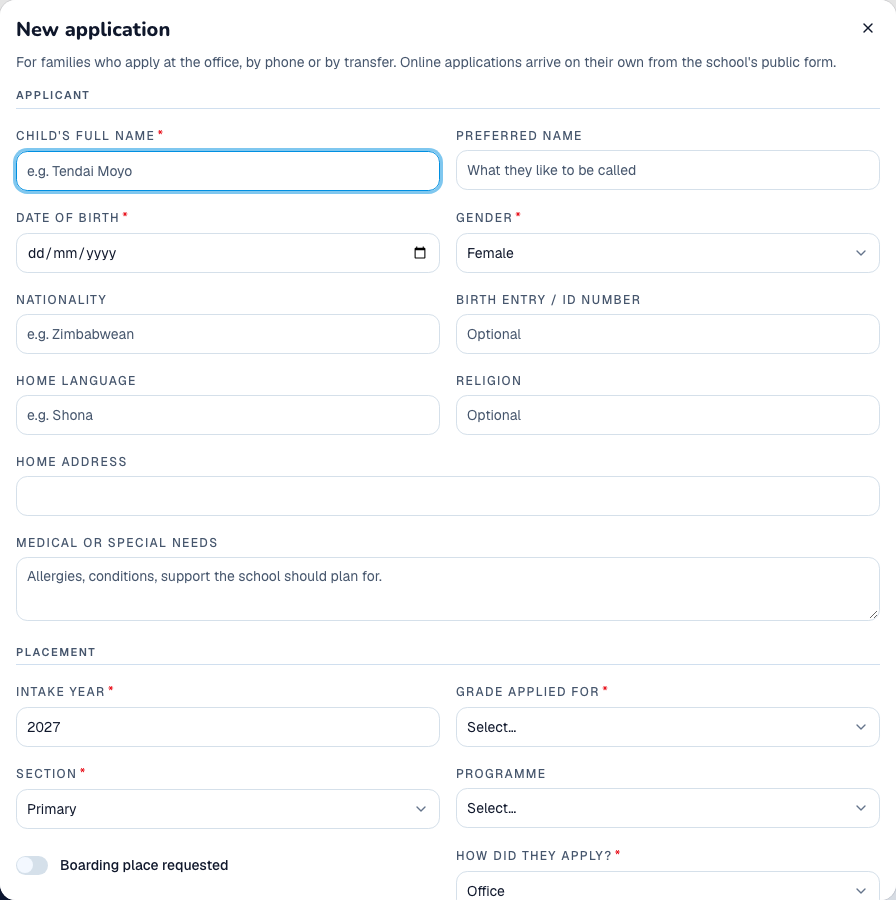
- Open Enquiries to record a prospective family’s contact details and enquiry.
- For an application, use the create-application action in Pipeline, or direct the family to the school’s public application page.
- Enter the child’s details, intended grade, guardian contacts and supporting documents.
- Submit or save, and retain the application reference for future follow-up.
What to check: The enquiry or application appears in Admissions with its reference and stage.
3. Screen an application and make an offer
- Open the application in Pipeline.
- Review learner, guardian and document details; request missing documents using the checklist action.
- Select Start screening, then add interview or assessment entries with notes and any score.
- When the decision is approved, select Offer a place and confirm.
- Review the offer letter and the application’s offer status.
What to check: The application moves to the offered stage; family acceptance is a separate step.
4. Convert an accepted application to a learner
- Check that the offer is accepted and any required application-fee information is recorded.
- Use the application’s learner-conversion action.
- Review the learner details and destination class, then select Create learner.
- Open Learners and verify the new record, guardians and class.
- Return to Admissions to confirm the application is enrolled.
What to check: The accepted applicant has a linked learner record. Do not repeat conversion if a learner already exists.